



Here you'll learn what each covers: from native Jira Space controls to project governance. Recently, Atlassian Jira Space Policies were updated, and as custom Jira Space templates help Jira admins standardize fields, statuses, and their configuration, the question arises: How do these controls support project governance, and what does the PMO still need to define? This article explains what native Jira controls cover, how Atlassian Projects supports ownership and stakeholder updates, and when Projectrak for Jira can help teams maintain project-level data and compare initiatives across their project portfolio.
Imagine the scenario: A PMO is reviewing six business transformation projects, and each team uses a previously approved Jira Space template. Fields follow the same naming conventions, and workflows use shared statuses.
Then the executive committee asks: “Who owns the expected business outcome? Which projects support the same strategic priority? Where is a decision needed before the next review? "
The configuration is consistent, but the answers to those questions still require several conversations.
As Jira's native controls provide a valuable foundation for governance, the next logic step would be to decide what information project leaders need, who maintains it, and how those are supporting decisions.
That's where the relationship between Jira Space administration and project governance becomes practical.
These Jira Space policies let Jira Admins restrict team-managed Spaces to global fields, global statuses, or both.
Jira Admins can now set a default policy for new Spaces, and Spaces created from a custom template can inherit the policy attached to its source Space.
According to Atlassian, these controls help address configuration differences that make cross-team reporting harder, confirming in their documentation that these policies apply to team-managed spaces on the Jira Cloud Standard, Premium, and Enterprise plans.
Managing those controls requires Jira Admin permissions, and custom Space templates provide reusable configurations, available for team-managed spaces on all paid plans. For Company-Managed, those custom templates remain enterprise-only, allowing only Jira Admins to create them.
For PMOs, these developments create a useful opportunity to review how configuration standards support the information needed for project oversight.
A Jira Space (formerly Jira Projects) in Cloud instances contains Work items and the configuration teams used to manage them, and this Jira Space may support a temporary initiative.
Before using these Jira Spaces as a reporting unit, it’s very important to understand their boundaries.
A Work item field describes an individual task, risk, milestone, or other work item, and its status describes that item's progress.
Project governance, as used here, means the responsibilities and decision practices surrounding a business initiative that brings accountability, purpose, escalation, and review. A shared task status doesn't, by itself, define whether the initiative is healthy or who can change its priorities.
Atlassian Projects lives in a separate app beyond Jira, however integrated in the same platform. It supports initiative context, owners, regular updates, and connects to Jira work.
Atlassian Projects and Jira Spaces are different entities; however, they can work together >>
On the other hand, Projectrak for Jira adds project-level management data and portfolio views within Jira. Its customizable project properties can describe a project initiative or Jira Space as a whole, alongside the work tracked inside it.
The first design decision is to agree on what each record represents: A portfolio becomes difficult to manage when a project means different things to different teams. Let’s fix that:
The table below connects common Jira management questions with the native capabilities that support them, the governance responsibilities your organization needs to define, and the areas where Projectrak for Jira can help maintain and compare project-level information:
|
Management Question |
Relevant native capability |
Project governance responsibility |
Where Projectrak may help |
|---|---|---|---|
|
Which fields and statuses may teams create? |
Space policies restrict local field and status creation in team-managed spaces |
Agree shared definitions and an exception process |
Maintain management information at project level. Native policies remain responsible for these configuration restrictions |
|
How should a new space start? |
Custom templates reuse supported space settings |
Decide which delivery practices and information standards apply |
Organize project fields into reusable layouts associated with spaces or projects |
|
Who owns the work and its outcomes? |
Jira has a Jira Space owner; Atlassian Projects supports initiative ownership |
Distinguish administration, delivery accountability, and sponsorship |
Represent additional roles through configured project fields |
|
What business context should reviewers see? |
Space details and Atlassian projects provide context. Projects also support custom fields. |
Choose the authoritative location for each piece of information |
Present selected project data together in a Jira-based management view |
|
Which initiatives need attention? |
Atlassian Projects provides updates; its native Jira field connects initiatives with work items |
Define health criteria, review frequency, and escalation decisions |
Filter and compare project records in Project Navigator |
These responsibilities connect. As consistent configuration makes information easier to compare, governance gives that information a meaning, an owner, and a place in the decision process.
Jira's native Space details include an owner, description, URL, and category. For Company-managed Spaces, they also use centrally administered schemes, including workflow schemes. Jira Space policies extend configuration guardrails to Team-managed Spaces; they are one part of Jira Administration.
Atlassian Projects covers substantial management context, as it includes owners, dates, status updates, fields, risks, and decisions. The native Atlassian Project field in Jira connects Work items to these initiatives, supporting viewing project context from Jira.
From a PMO perspective, weekly communication and links to delivery work, that combination may already meet the need; however, confirming that users have access to projects and understand where updates belong is critical.
The question to ask is concrete: Can the intended reviewers find the project-specific information they need, trust its definitions, and act on it without rebuilding the picture each time?
Projectrak for Jira is worth evaluating when the PMO wants a structured set of management fields, adjusted to them, and maintained and compared across projects within Jira. Also, when you’re only working with Jira, and no more apps for any other project end up being needed.
Projects managed with this Atlassian Marketplace app include getting to the detail of stakeholders, list, date, status, and priority as predefined fields for projects, and these could represent a sponsor, business unit, review date, or overall delivery assessment. Whatever is needed.
Those labels are configuration examples, rather than an automatically supplied governance model. It’s up to the user, PMO, or administrator to define the project data structure.
Projectrak Layouts organize within a project data sheet all the information you need to gather about a specific project, and divide it into sections. It has a predefined option: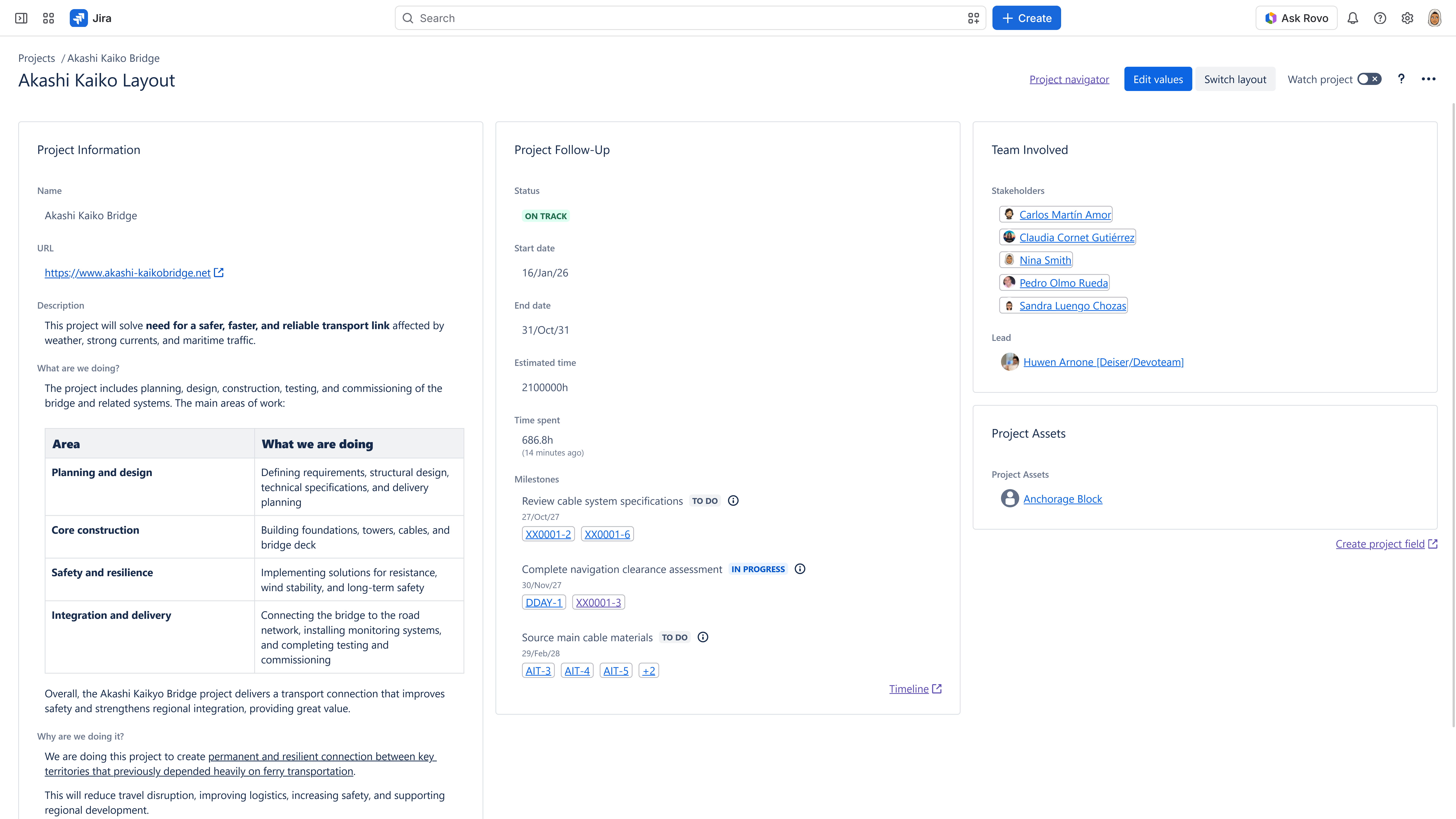
The List View lets users choose display fields and edit permitted values right from the view in most cases, followed by search criteria that help narrow the portfolio by relevant project data.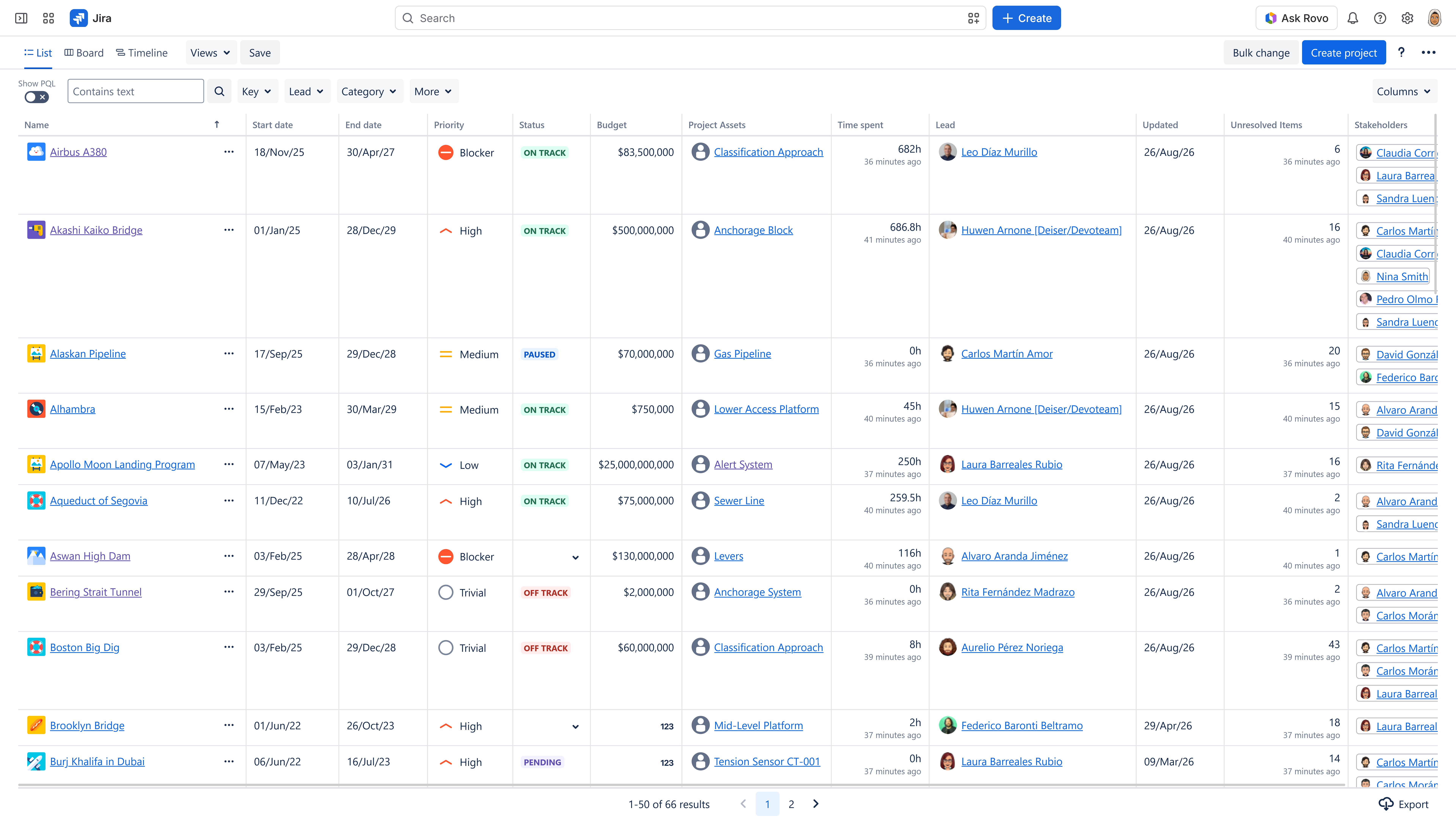
As Projectrak permissions might still require design, this app separates configuration and value access permissions, with different arrangements for team-managed and company-managed Spaces, plus field value restrictions. The permissions approach to configuration will depend on the audience.
The PMO must still define the review process and decision rights, as the Marketplace app provides a place to maintain and inspect supporting information.
This is an implementation example. Imagine six regional teams preparing the same business rollout, where each initiative has its own Jira team-managed space. Let’s see how the PMO is set to organize the following with all the resources we have mentioned so far: 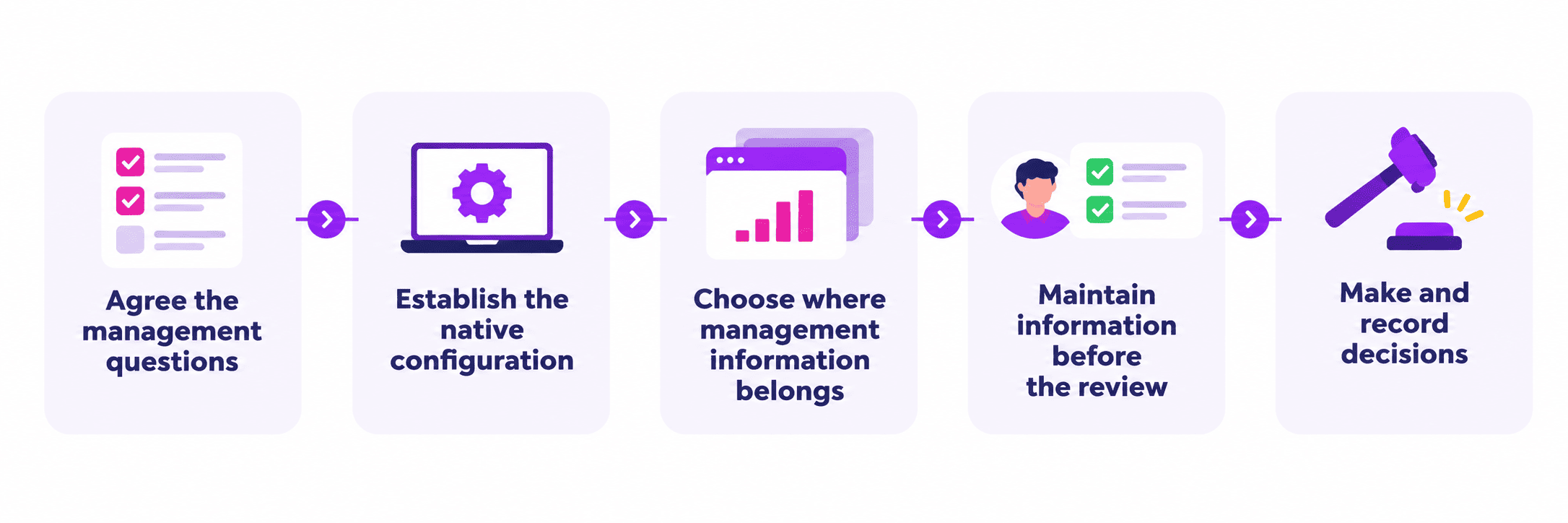
Jira native project controls may be enough when the main challenge is the consistency of the configuration, like a reusable setup, and a manageable reporting model using just Jira and Atlassian Projects.
If that’s not enough, it’s advisable to evaluate Projectrak for Jira when stakeholders need customizable and configurable project-level data and portfolio views inside Jira. Only if the existing setup makes the information difficult to maintain or compare. Test a small set of representative initiatives before expanding the model with a trial, just to see which approach is more convincing.
Projectrak also has a Standard and an Advanced edition. The Advanced Edition has bulk value changes across the portfolio.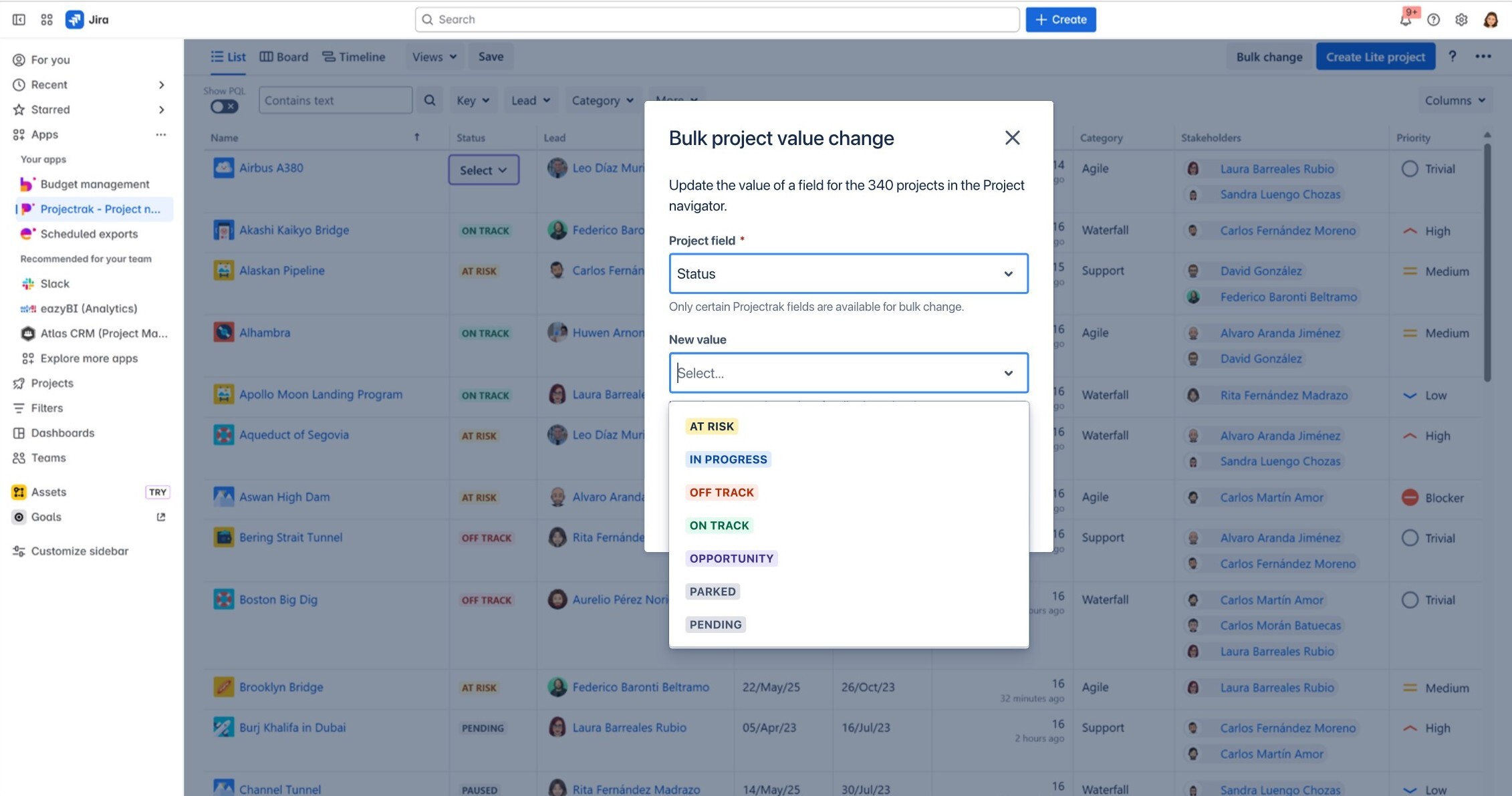
Start this approach in the next portfolio meeting. Identify the questions that take long to answer, and then map each one to the data source, owner, and review action.
If that exercise reveals a need for shared management fields and project views within Jira, explore Projectrak for Jira using those questions as your evaluation criteria for your PMO.









No Comments Yet
Let us know what you think