



---
title: Block issue creation in archived Jira projects
description: Jira projects should be neat, especially when, as a Jira Project Admin, don't want new issues in old or archive Jira projects. Learn how to work this out.
image: https://blog.deiser.com/hubfs/Portada_Post_24.png
---

[![Deiser Blog](https://blog.deiser.com/hubfs/ES/Devoteam/DeiserBlog_Devoteam_logo_negativo.svg "Deiser Blog")](https://blog.deiser.com/en)

[![BACK TO DEISER.COM](https://hubspot-no-cache-eu1-prod.s3.amazonaws.com/cta/default/3363011/36806d56-f0e8-4a64-8033-651e285ac074.png)](https://hubspot-cta-redirect-eu1-prod.s3.amazonaws.com/cta/redirect/3363011/36806d56-f0e8-4a64-8033-651e285ac074)

[EN](https://blog.deiser.com/en) | [ES](https://blog.deiser.com/es)

**

**

[![Deiser Blog](https://blog.deiser.com/hubfs/ES/Devoteam/DeiserBlog_Devoteam_logo_positivo.svg "Deiser Blog")](https://blog.deiser.com/en)

[![BACK TO DEISER.COM](https://hubspot-no-cache-eu1-prod.s3.amazonaws.com/cta/default/3363011/36806d56-f0e8-4a64-8033-651e285ac074.png)](https://hubspot-cta-redirect-eu1-prod.s3.amazonaws.com/cta/redirect/3363011/36806d56-f0e8-4a64-8033-651e285ac074)

[EN](https://blog.deiser.com/en) | [ES](https://blog.deiser.com/es)

**

[![Deiser Blog](https://blog.deiser.com/hubfs/ES/Devoteam/DeiserBlog_Devoteam_logo_negativo.svg "Deiser Blog")](https://blog.deiser.com)

** **

[EN](https://blog.deiser.com/en) | [ES](https://blog.deiser.com/es)

**

**Menu**

[EN](https://blog.deiser.com/en) | [ES](https://blog.deiser.com/es)

** **

[![Free Pack](https://hubspot-no-cache-eu1-prod.s3.amazonaws.com/cta/default/3363011/b010f050-3ec2-4ec3-a9c6-53c6e31a13eb.png)](https://hubspot-cta-redirect-eu1-prod.s3.amazonaws.com/cta/redirect/3363011/b010f050-3ec2-4ec3-a9c6-53c6e31a13eb)

[![Buy Now](https://hubspot-no-cache-eu1-prod.s3.amazonaws.com/cta/default/3363011/45939789-0a7b-42d2-9620-c7619e153fa6.png)](https://hubspot-cta-redirect-eu1-prod.s3.amazonaws.com/cta/redirect/3363011/45939789-0a7b-42d2-9620-c7619e153fa6)

Search

![](https://blog.deiser.com/hubfs/Portada_Post_24.png)

[Project Management](https://blog.deiser.com/en/tag/project-management) | [Projectrak for Jira](https://blog.deiser.com/en/tag/projectrak-for-jira) |

 3 min read

# Block issue creation in archived Jira projects

[![Álvaro Aranda](https://blog.deiser.com/hubfs/alvaro-aranda-ACP-DEISER_.jpg)](https://blog.deiser.com/en/author/alvaro-aranda)

 Written by [Álvaro Aranda](https://blog.deiser.com/en/author/alvaro-aranda)

 Jul 14, 2016 9:11:00 AM

- [Tweet](https://twitter.com/share)

**Jira projects** don't have an end date, but it's common for users to expect a due date after which you don't want anyone to create more issues for that project. In this article we'll going to show how to solve this problem with date custom fields. 

As we said, Jira doesn't have any project-date restrictions, but this is something you don't have to worry about anymore.

## Creating a project date field for the project

First of all, be sure to [download Projectrak from the Atlassian Marketplace](https://marketplace.atlassian.com/apps/1210816/profields-jira-project-custom-fields?hosting=server&tab=overview). Once it's running, **access the Field Manager** on the administration Jira options, where you'll find the app section, and then **create a date field**.

You'll find different options for the creation of different types of fields; this is the core of Projectrak (formerly Profields) and it can get a bit complex. However, in this situation we only need the one that specifies Dates.

Once the date field has been created, associate it to your Projectrak layout in the Layout Manager, just below the Field Manager. This layout must be associated with your project, and there are two places where you can do that:
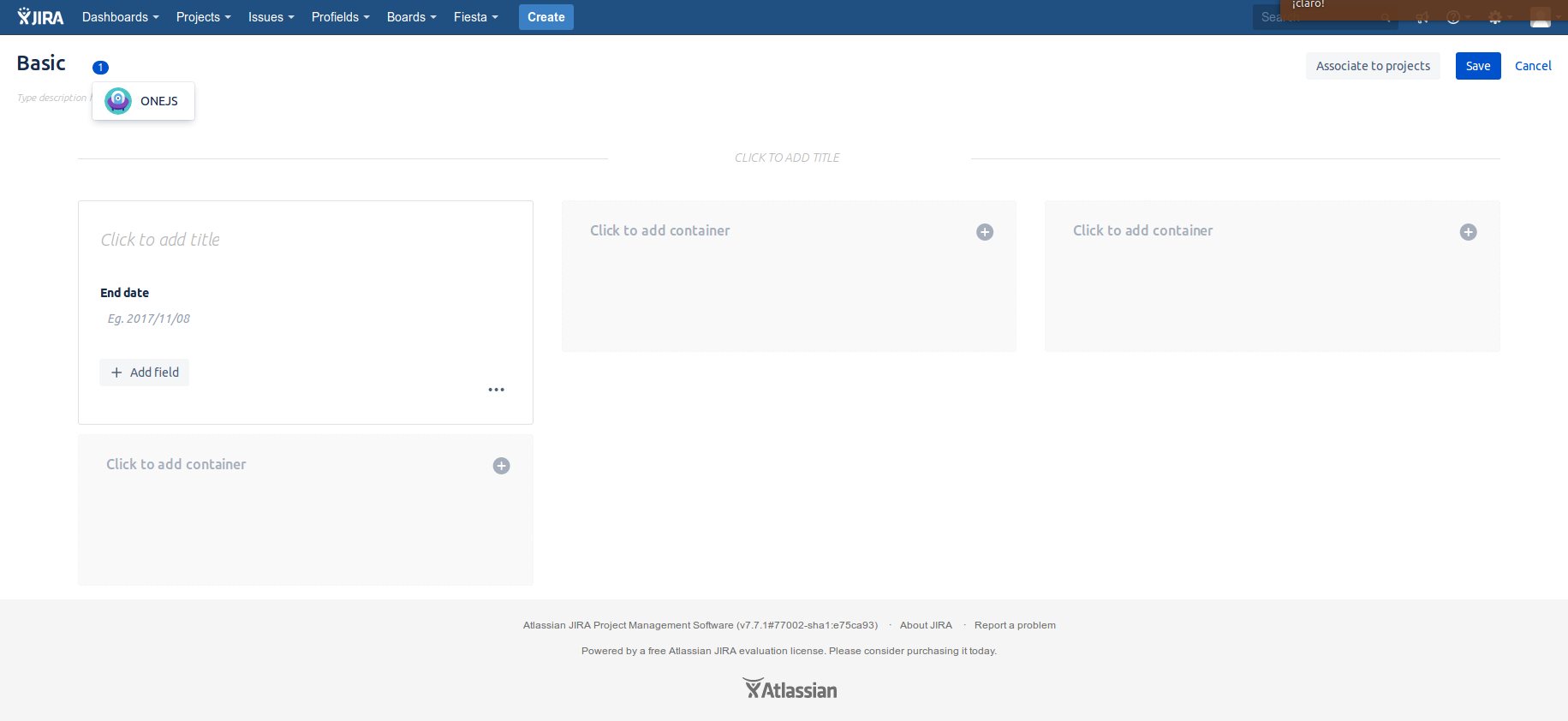
-    In the project administration options
-    Using the **Associate** option on the Layout Manager.

![Layout manager with project date field for Jira](https://blog.deiser.com/hs-fs/hubfs/layout%20manager%20with%20project%20date%20field%20for%20Jira.png?width=1831&name=layout%20manager%20with%20project%20date%20field%20for%20Jira.png)

Once the date field has been created, it's time to give the chosen field the desired value. In this case, it's the end date of your project.
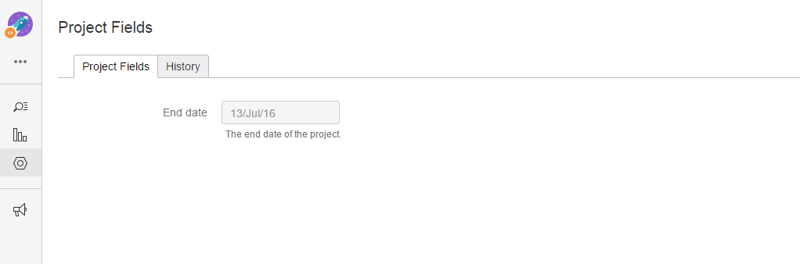
![Setting up Jira's project fields](https://blog.deiser.com/hs-fs/hubfs/setting-date-fields-on-jira-projects_Atlassian_DEISER.png?width=800&name=setting-date-fields-on-jira-projects_Atlassian_DEISER.png)

## Creating a Projectrak validator

Despite having set the end date in our project, issues can still be created there. That's precisely what we want to avoid. That's why we need a Projectrak validator:
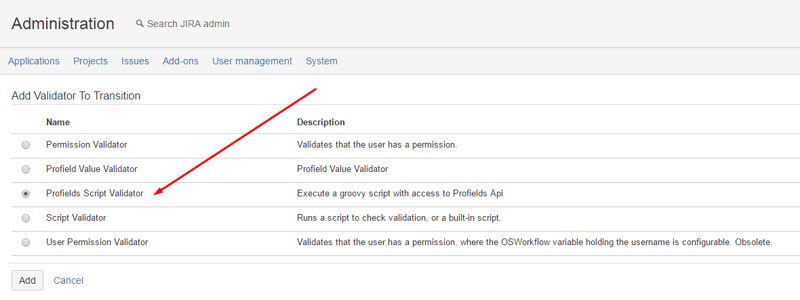
![Creating jira projects validator with Profields](https://blog.deiser.com/hs-fs/hubfs/Jira-projects-profields-validator_Atlassian_DEISER_project-manager.png?width=800&name=Jira-projects-profields-validator_Atlassian_DEISER_project-manager.png)  
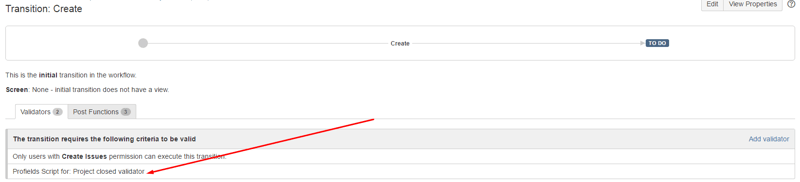
As the screenshot shows, it's necessary to get into our project workflow, once there, **select the Projectrak Script Validator.**

**A second validator is needed: the Projectrak Value Validator,** which allows to compare values with an equal or not-equal comparator 

In this case, we'll use a "greater" comparator that includes from "today" until the end-date of the project.

This script will do the work for you:
**import com.atlassian.jira.component.ComponentAccessor **

**import com.deiser.jira.profields.api.field.Field **

**import com.deiser.jira.profields.api.field.FieldService **

**import com.deiser.jira.profields.api.field.date.DateField **

**import com.deiser.jira.profields.api.value.ValueService **

**def END_DATE_FIELD_ID = 3**

**def project = issue.projectObject **

**def fieldService = ComponentAccessor.getOSGiComponentInstanceOfType(FieldService.class) **

**def valueService = ComponentAccessor.getOSGiComponentInstanceOfType(ValueService.class) **

**def field = fieldService.get(END_DATE_FIELD_ID) **

**def endDateFieldValue = valueService.getValue(project, (DateField) field) **

**if ((endDateFieldValue).before(new Date())) { **

** throw new Exception("The project is closed, you cannot create more issues on it.") **

**}**


## ![How to create project dates field? Jira projects with profields](https://blog.deiser.com/hs-fs/hubfs/how-to-create-project-date-fields-in-jira-woth-profields-validator_Atlassian_DEISER.png?width=800&name=how-to-create-project-date-fields-in-jira-woth-profields-validator_Atlassian_DEISER.png)

## Test goal!!

Now it's time to test all we've done.

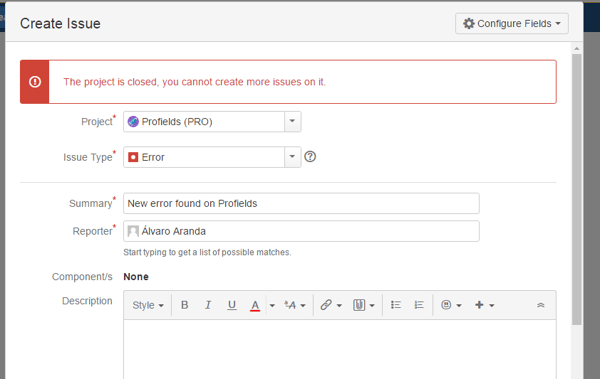
How will you know if it's broken? By creating an issue outside the valid date ranges for the project, if the issue appears in the project, something is not working as it should. Here's the example:
![Testing jira projects](https://blog.deiser.com/hs-fs/hubfs/testing-the-setting-of-an-end-date-of-a-jira-project_Atlassian_DEISER_tesrt.png?width=600&name=testing-the-setting-of-an-end-date-of-a-jira-project_Atlassian_DEISER_tesrt.png)

Yes!!! We usually don't like error messages, but we do love this one. The same problem could also be solved with a list field with "Open" and "Close" as values, for example.


- [Tweet](https://twitter.com/share)

![](https://blog.deiser.com/hs-fs/hubfs/social-suggested-images/Imagen_CTA_1-1.png?width=900&name=Imagen_CTA_1-1.png)

## Enhance Jira for project management 

Learn what's the best practice to transform Jira into a project tracker, and start making your life easy at work.

[![READ THE ARTICLE](https://hubspot-no-cache-eu1-prod.s3.amazonaws.com/cta/default/3363011/b201d62d-fdf6-4364-8a82-0b9d5364635a.png)](https://hubspot-cta-redirect-eu1-prod.s3.amazonaws.com/cta/redirect/3363011/b201d62d-fdf6-4364-8a82-0b9d5364635a)

[** ](https://blog.deiser.com/en)

Next Story

[Jira REST API: Pros and Cons →](https://blog.deiser.com/en/jira-rest-api-pros-and-cons)

## You May Also Like

These Stories on Project Management

[![](https://blog.deiser.com/hubfs/EN/Blog/Post/Turn%20Jira%20billable%20hours%20into%20a%20centralized%20project%20budget%20visibility/Jira-Time-Tracking-is-only-half-of-the-job-blogpost-cover-Deiser_devoteam.jpg) ](https://blog.deiser.com/en/jira-billable-hours-centralized-project-budget-visibility)

[Project Management](https://blog.deiser.com/en/tag/project-management)

### [Turn Jira billable hours into a centralized project budget visibility](https://blog.deiser.com/en/jira-billable-hours-centralized-project-budget-visibility)

 Jun 30, 2026 4:54:00 PM |

 4 min read

[![](https://blog.deiser.com/hubfs/EN/Blog/Post/Guide%20to%20Atlassian%20Collections%20-%20Teamwork,%20Service,%20Software,%20Strategy/Guide-Atlassian-Collections-blogpost-cover-Deiser.jpg) ](https://blog.deiser.com/en/guide-atlassian-collections-teamwork-service-software-strategy)

[Project Management](https://blog.deiser.com/en/tag/project-management)

### [Atlassian Collections: Teamwork, Service, Software, Strategy & Product](https://blog.deiser.com/en/guide-atlassian-collections-teamwork-service-software-strategy)

 Jun 3, 2026 1:19:59 PM |

 7 min read

[![](https://blog.deiser.com/hubfs/EN/Blog/Post/Implementing%20a%20Project%20Management%20Office%20Charter%20and%20Clause%20in%20Jira/Implementing-Project-management-Office-Charter-Clause-Jira-atlassian-teamwork-collection_pmo-collection-jira-devoteam-deiser.jpg) ](https://blog.deiser.com/en/project-management-office-charter-clause-in-jira)

[Project Management](https://blog.deiser.com/en/tag/project-management)

### [Implementing a Project Management Office Charter and Clause in Jira](https://blog.deiser.com/en/project-management-office-charter-clause-in-jira)

 Apr 23, 2026 4:42:00 PM |

 6 min read

## No Comments Yet

Let us know what you think

### Subscribe by Email

[![Deiser | Your partner in digital transformation](https://blog.deiser.com/hubfs/ES/Devoteam/Deiser_Part_of_Devoteam_RGB_Full_logo_white-1.svg "Deiser | Your partner in digital transformation")](https://www.deiser.com/)

Your partner in digital transformation

[Let's connect](https://www.deiser.com/contact-us?hsCtaTracking=ed3a14c0-ca98-4ee5-84d6-0c0cc1835409%7C48f243f7-1160-4d08-8b45-5152265f37da)

Calle Pedro Muñoz Seca 2, 6ª Planta.  
28001 - Madrid | SPAIN   
[+34 912 824 700](tel:+34%20912824700)   
[info@deiser.com](mailto:info@deiser.com)

<https://www.youtube.com/user/DEISERCHANNEL/videos><https://www.facebook.com/156907871048762><https://www.instagram.com/deiserteam><https://www.linkedin.com/company/398203><https://twitter.com/deiser>

[Cookies policy](https://www.deiser.com/cookies-policy?hsLang=en) | [Privacy policy](https://www.deiser.com/privacy-policy?hsLang=en) | [Legal statement](https://www.deiser.com/legal-statement) | [Information security](https://www.deiser.com/information-security) | [Sitemap](https://www.deiser.com/sitemap)

![](https://px.ads.linkedin.com/collect/?pid=2244641&fmt=gif) ![](https://px.ads.linkedin.com/collect/?pid=6684234&fmt=gif) ![](https://px.ads.linkedin.com/collect/?pid=2244641&fmt=gif)

```json
{
  "@context" : "https://schema.org",
  "@type" : "BlogPosting",
  "author" : {
    "@type" : "Person",
    "name" : "Álvaro Aranda",
    "url" : "https://blog.deiser.com/en/author/alvaro-aranda"
  },
  "dateModified" : "2021-04-05T11:05:24.610Z",
  "datePublished" : "2016-07-14T07:11:00.000Z",
  "headline" : "Block issue creation in archived Jira projects",
  "image" : [ "https://blog.deiser.com/hubfs/Portada_Post_24.png" ],
  "mainEntityOfPage" : {
    "@id" : "https://blog.deiser.com/en/how-to-prevent-the-creation-of-issues-in-old-jira-projects",
    "@type" : "WebPage"
  },
  "publisher" : {
    "@type" : "Organization",
    "logo" : {
      "@type" : "ImageObject",
      "url" : "https://blog.deiser.com/hubfs/ES/Devoteam/Deiser_Part_of_Devoteam_RGB_Full_logo_colour-1.svg"
    },
    "name" : "Deiser"
  }
}
```

```json
{
  "@context" : "https://schema.org",
  "@type" : "Organization",
  "description" : "Deiser Part of Devoteam helps you transform digitally, optimizing processes and team collaboration with tailored Atlassian solutions and ongoing support.",
  "logo" : "https://www.deiser.com/hubfs/deiser-logo.png",
  "name" : "Deiser",
  "sameAs" : [ "https://www.linkedin.com/company/deiser", "https://twitter.com/deiser" ],
  "url" : "https://www.deiser.com"
}
```